
Quick Episode Creation - Write just one line, and you can make the Episode you've been dreaming of, too! ✨
Hi, Protagonists and Directors!
Sion from Frontia here ☺️
Ever caught yourself thinking, "I wish someone would make a story with this character, in this world"?
Maybe you've wanted to make your own Episode on Frontia, but building a world, setting up characters, and preparing images felt like too much to even start.
Now, write just one line about the story you want, and Frontia builds the rest for you: the world, the characters, the images, and the prologue.
In about 1–2 minutes, you can jump right in and play the Episode you made.
The features below are available after you update to version 1.8.0.
Already on 1.8.0 but don't see it yet? Close the app and open it again.
👉 Update the app
What's new
- Tap “Create +” on MY (or “Create episode” if you haven't made any Episodes yet), write one line, and pick an art style. That's all it takes to make an Episode.
- The world, characters, character images, backgrounds, and prologue are ready in about 1–2 minutes.
- You can play your Episode right away, and keep editing it in Frontia Studio whenever you like.
STEP 1. Write one line
On MY, tap “Create episode” in the center if you haven't made any Episodes yet, or “Create +” at the bottom right if you have. Then choose a genre and preference, and write your story in one line.
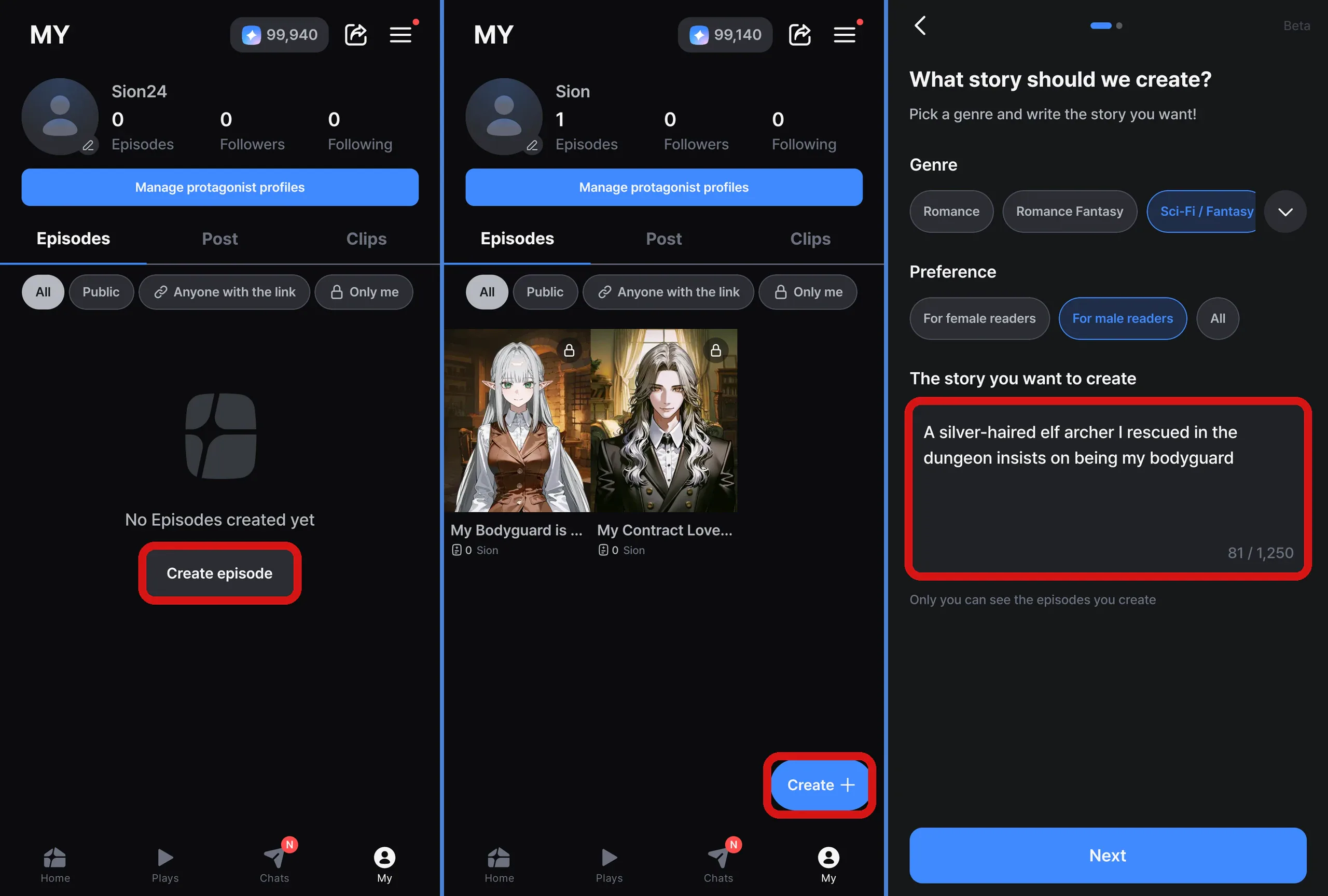
No Episodes yet: “Create episode” / Already have some: “Create +” → choose a genre and preference → write one line under “The story you want to create”
- Just describe who the character is and how they're connected to you, in a single sentence.
- Not sure what to write? Each genre shows sample ideas right in the story box.
- Have an original character you've been dreaming up? Add their looks and personality, and your Episode will be built around them.
[Ideas to get you started]
- The red-eyed Northern Grand Duke proposes to the villainess I became
- My blond pianist childhood friend returns after ten years, smiling only at me
- A witch in black breaks my curse and asks for a date in return
STEP 2. Pick an art style
Choose a view style and an image, then tap “Create episode”.
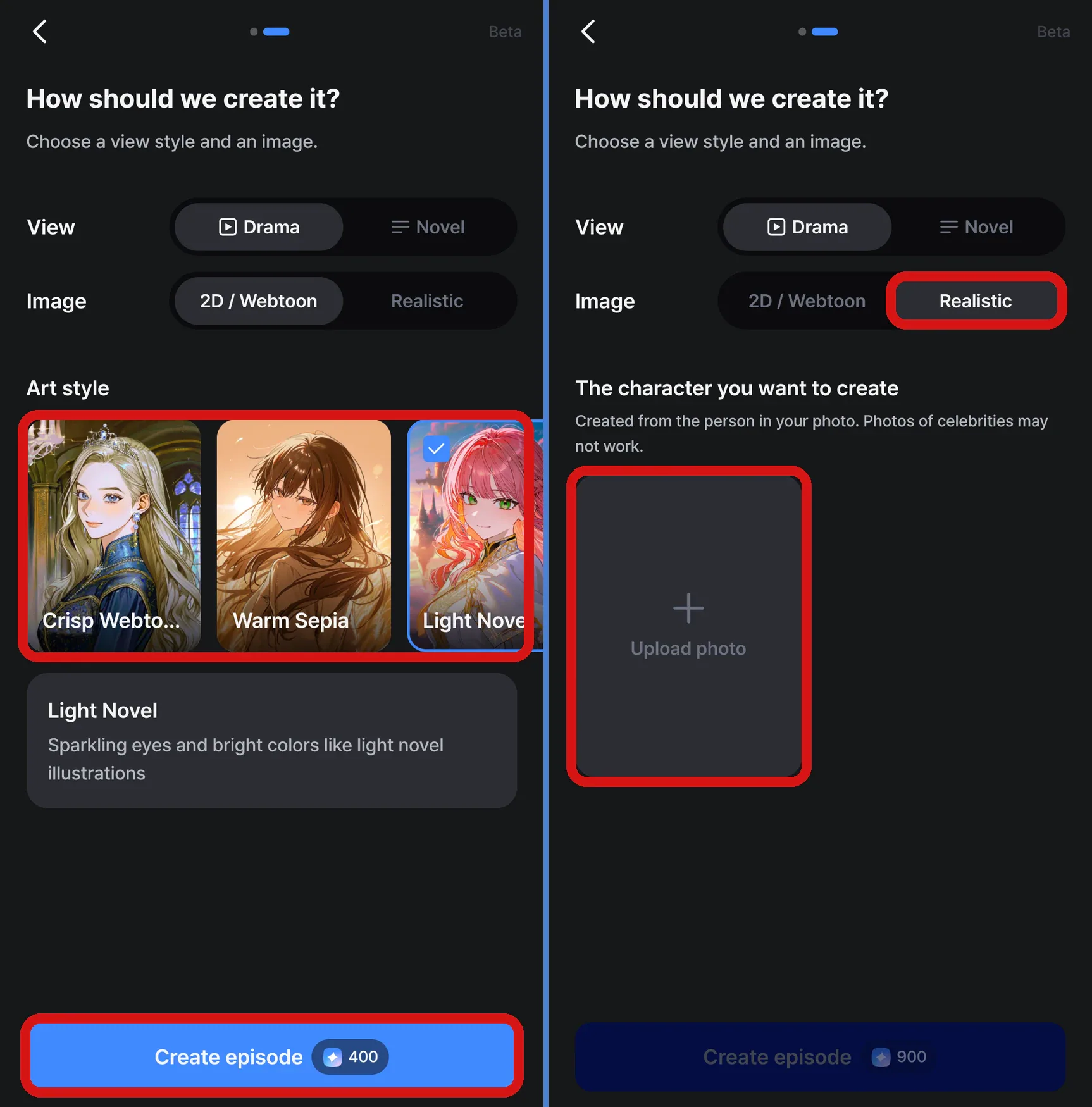
For 2D / Webtoon, pick one of three art styles. For Realistic, upload a single photo.
- View: Your Episode is made in the style you pick, either “Drama” or “Novel”.
- 2D / Webtoon: Choose from “Crisp Webtoon”, “Warm Sepia”, or “Light Novel”.
- Realistic: Upload one photo, and the character is created from the person in it. Realistic is available for “Drama” only.
STEP 3. Play the moment it's ready
When you see “Your episode is ready!”, tap “Play now”.
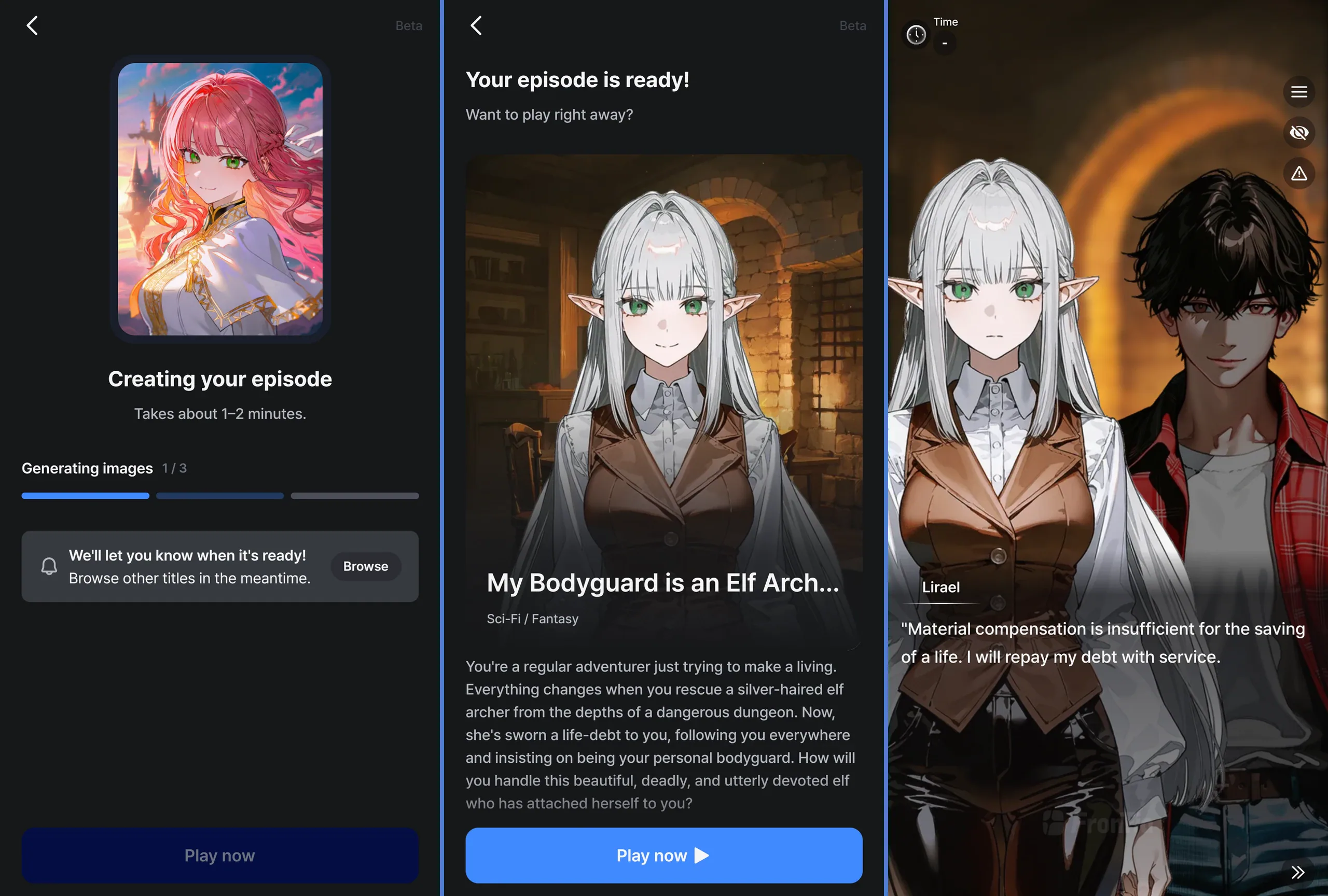
An Episode I made from a single line: “A silver-haired elf archer I rescued in the dungeon insists on being my bodyguard.”
I gave it a try myself with the line above!
A minute or two later, I had an Episode called “My Bodyguard is an Elf Archer I Rescued”, complete with a story intro, two characters including the elf archer Lirael, and a background to match. It opened with Lirael vowing to repay her life-debt by guarding me :)
- While it's being made, you'll see the progress go from “Building the world” → “Generating images” → “Turning it into an episode”.
- Feel free to tap “Browse” and check out other Episodes while you wait. Your Episode keeps being made even if you leave the screen, and we'll send you a notification when it's ready.
- If your notifications are turned off, be sure to turn them on so you don't miss the moment it's done!
- On the finished screen, you can check the title, story intro, and characters before you start playing.
📌 Episodes you create are saved as Only me, so no one else can see them.
Want to edit or share your Episode?
You can keep editing it in Studio and make it public.
- On your Episode's detail page, tap the ⋮ button at the top right and select “Edit in Studio” to open that Episode in Studio.
- If you've edited the world, characters, or prologue, tap “Publish episode” to create a new version.
- In Studio's “Version history”, open the ⋯ menu on the version you want to share and select “Public”. Then other Protagonists can play it too.
Good to know
- Each Episode uses ⭐400 for 2D / Webtoon, ⭐900 for Realistic.
- Stars are used only once, when your Episode is complete. If it can't be created, no Stars are used.
- Quick Episode Creation works only in the app, one Episode at a time.
- All created Episodes are suitable for all ages. Depending on your story or photo, an Episode may not be created. If that happens, try again with a different story or photo.
- Photos of celebrities may not work. Uploading a photo of someone else without their permission may violate our policies, so please be careful.
- Quick Episode Creation is currently in Beta. We'll keep improving it based on your feedback.
Have a story you've always wanted to see? Head to MY and tap “Create +” (or “Create episode”).
Make your Episode public through Studio, or share it with everyone on our official Discord!
Your bug reports and suggestions while trying out Quick Episode Creation go a long way in shaping Frontia :)
We can't wait to see what you create!
Thank you,
Sion 🙇♂️