
My home screen isn't showing Episodes I like
Last updated: October 19, 2026
Go to MY → menu (≡) at the top right → Settings → Content preference and choose For female readers / Male-oriented / All. The Episodes on Home follow this setting, and choosing All shows Episodes for every preference.
On the web, you can change it in Settings → Content recommendations.
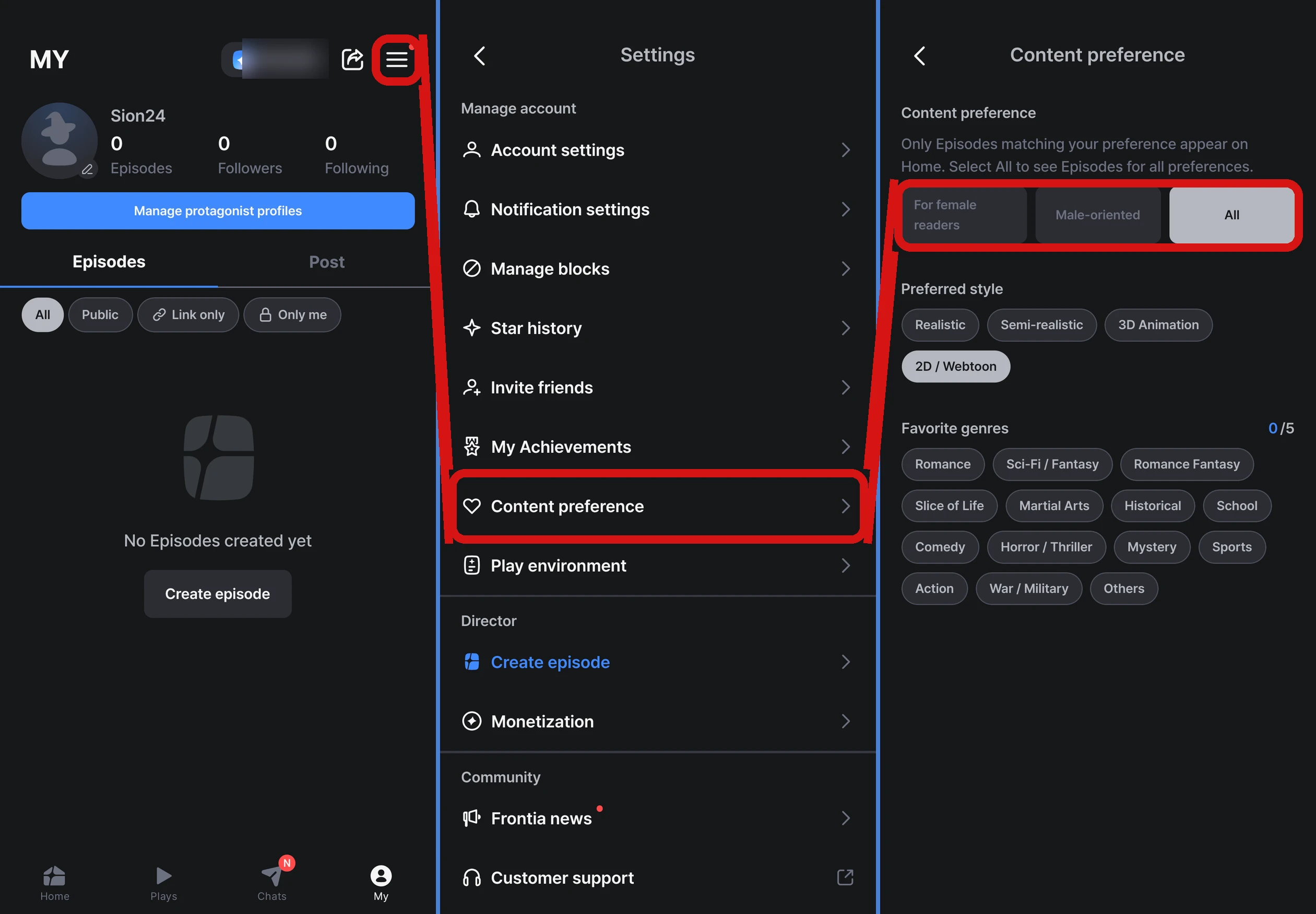
- When you change it, Home is rearranged to match your new preference
- At first, it's set based on the gender you entered when signing up. If you didn't enter a gender, it starts as All
- You can change it again at any time
Change your preferred style and favorite genres here too
On the same screen, you can also change your Preferred style (art style) and Favorite genres (web: Preferred genres). They start with what you chose when you signed up, and any changes are reflected in your recommendations.
FAQ
Q. Do I need to change the gender on my profile?
No. Content preference is a setting separate from your profile gender. Gender can't be changed after signing up, but content preference can be changed at any time.
Q. I don't see Content preference in the menu.
Please update the app to the latest version. For details, see I can't see new features after updating.