
Soul & Chat
A character messaged me first
Last updated: October 19, 2026
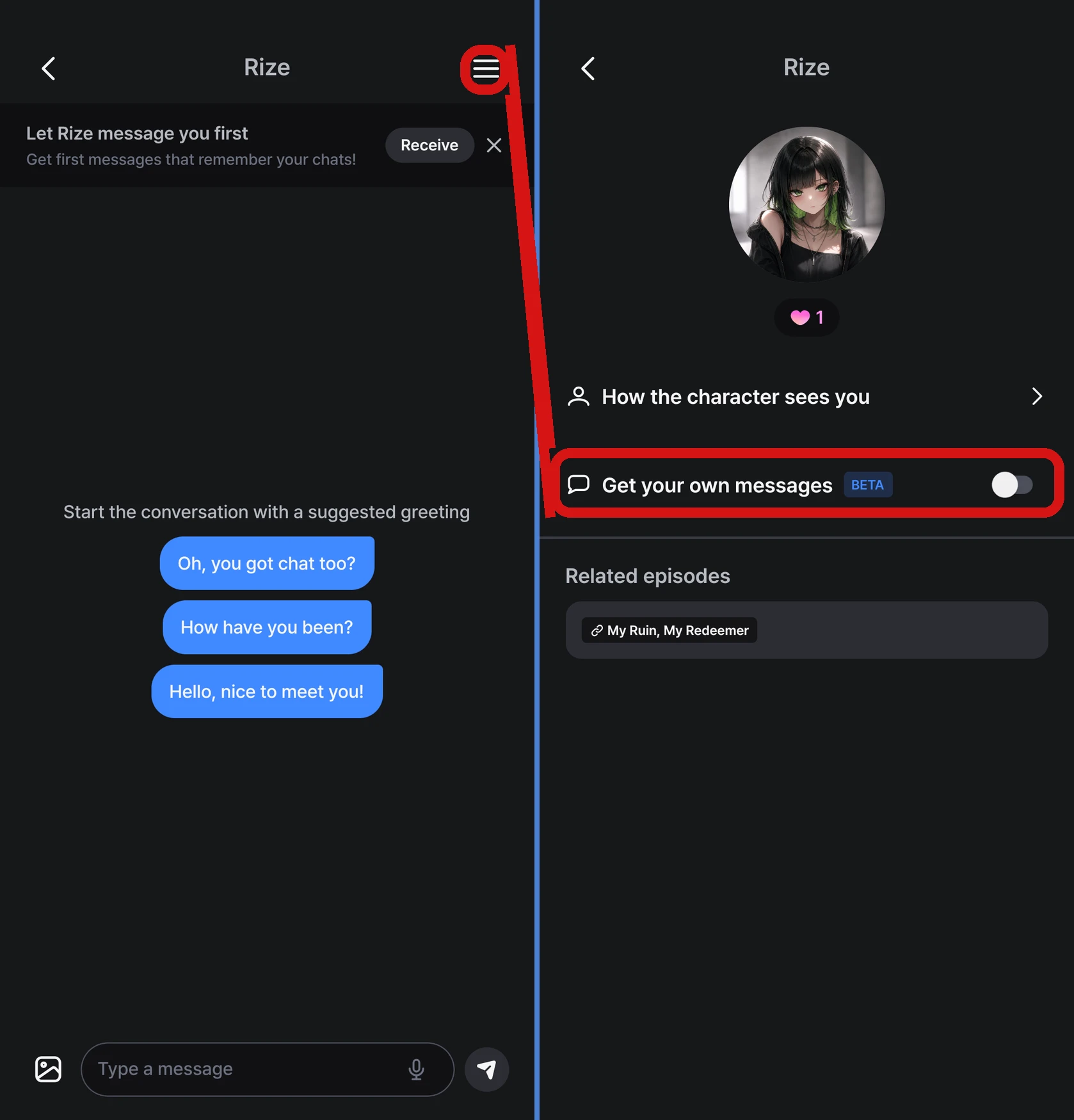
If 「Get your own messages」 is on in a chat, the character sends you messages first, based on how your conversation has gone so far. If you don't want them, turn off 「Get your own messages」 in the menu at the top right of that chat. If you want them again, turn it back on in the same place.
When are Stars used?
- Just leaving it on doesn't use any Stars
- 10 Stars are used when a character's message actually arrives
- If you don't have enough Stars, no message is sent and no Stars are used
FAQ
Q. I turned it on, but the character hasn't messaged me first.
Messages a character sends first are based on how your conversation has gone, so they may not arrive right after you turn it on. Please check the following.
- That 「Get your own messages」 is on in the menu at the top right of the chat
- That you have enough Stars
Q. I want to be notified when a message arrives.
Messages a character sends first come with a push notification, just like regular chat replies. Notification permission needs to be on for your device.
Good to know
- What the message says depends on the character's personality and your conversation
- Messages a character sends first don't count toward the chat counts for daily missions and achievements
- If you delete your account, the setting is turned off and you won't receive any more messages
Was this helpful?