
I didn't get reward Stars I should have received
Last updated: October 29, 2026
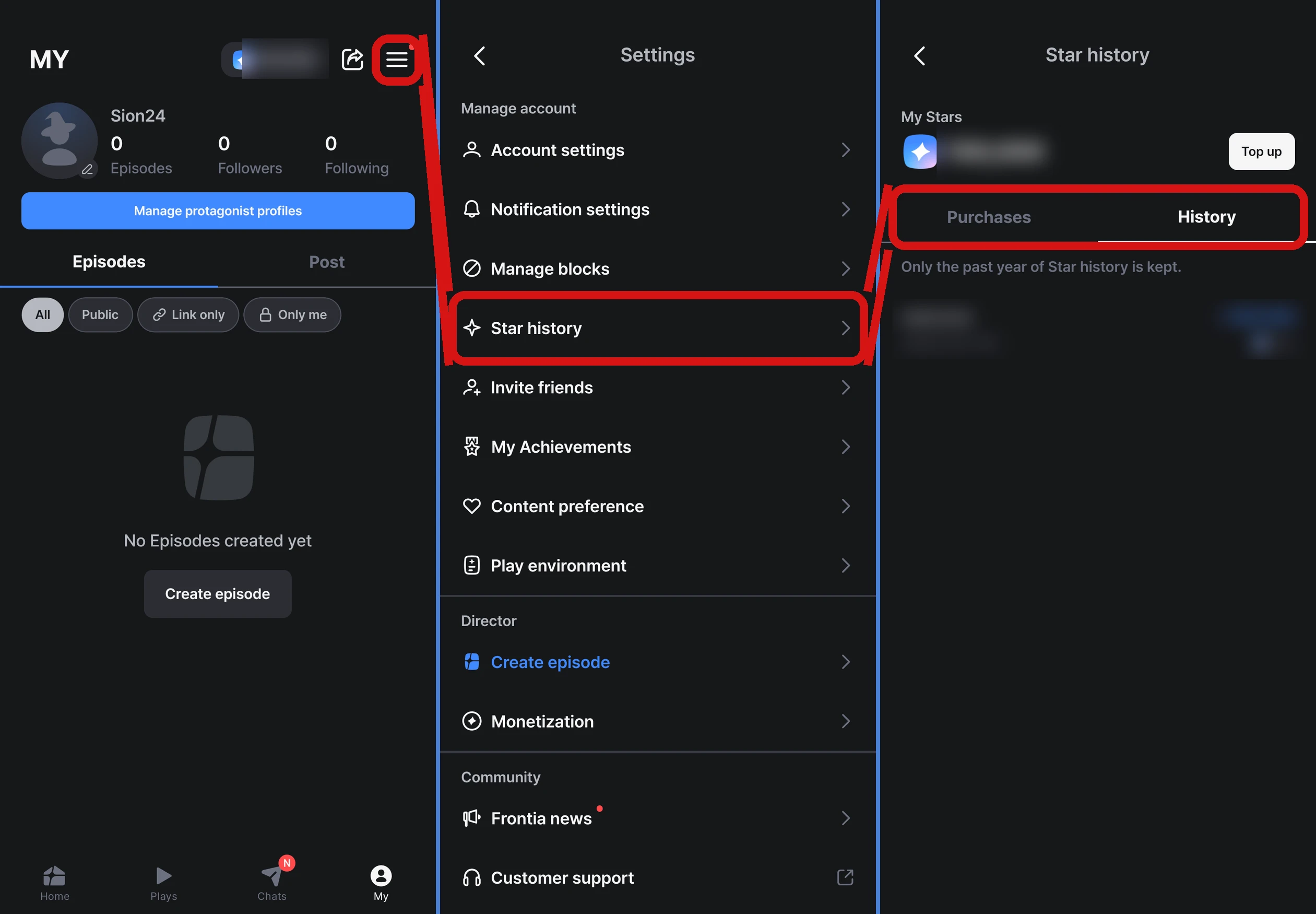
First, check the 「History」 tab in MY → menu (≡) at the top right → 「Settings」 → 「Star history」 to see whether the Stars came in. Most free Star rewards only arrive after you tap a claim button yourself, or only when you take part through the specified route.
How to check your Star history
The 「History」 tab shows both the Stars you received and the Stars you used. On the web (frontia.ai), you can find it in 「Settings」 → 「Star history」. If you received Stars but they don't show in your balance, fully close and restart the app.
What to check for each reward
Welcome Stars
- You claim them from the pop-up that appears the first time you open the app
- They can only be received once per device and account. Even if you switch devices, you can't get them again on the same account, and you can't get them on a device that has already received Welcome Stars, even with a new account
- You can't get them again if you delete your account and sign up again
- If you signed up on the web (frontia.ai), you also get a separate web sign-up gift of 200 Stars, once per account. It shows up in your Star history as a web sign-up gift
Daily missions
- After completing a mission, you need to tap 「Get Stars」 yourself to receive it. Each mission must be claimed separately
- Rewards are claimed in the app
- There's a limit on how many times rewards can be claimed per account and device. If another account has already claimed that day's reward on the same device, you'll see a message saying the reward has already been claimed on another account, and you can't claim it
- Unclaimed rewards and progress disappear every day at 6 a.m. local time. After that, they can't be claimed
For details, see I want to get free Stars.
Achievements
- They aren't added automatically. You need to tap each completed card yourself in 「My Achievements」 in the app
- Each tap on a card claims one step
For details, see How do I claim achievement rewards?.
Inviting friends
- The invited friend needs to enter the code during sign-up in the app and finish signing up for both of you to receive it
- The code can't be entered after sign-up is finished
- It can only be received once per account and device
For details, see Where do I enter a friend's invite code?.
Writing a review
- You need to tap the review request pop-up that appears during play, write a review, and come right back to the app to receive it
- Reviews written directly in the store without going through the pop-up aren't eligible
- Once per account, and only in the app
For details, see Can I get Stars for writing a review?.
Events
For event rewards, please check the participation conditions and period in the announcement. They can't be claimed after the event ends.
Still can't find it?
If you met all the conditions and it's not in your Star history either, let us know through MY → menu (≡) at the top right → 「Settings」 → 「Community」 → 「Contact support」. Depending on your app version, the 「Frequently asked questions」 screen may open first. If so, tap 「Contact support」 at the bottom. Send us your login email address, the name of the reward you were trying to get, and a screenshot of the screen, and we'll help look into it.
Free Stars you receive disappear after 30 days. If you remember receiving them and your balance went down, see My Stars suddenly disappeared.