
I want to get free Stars
Last updated: October 19, 2026
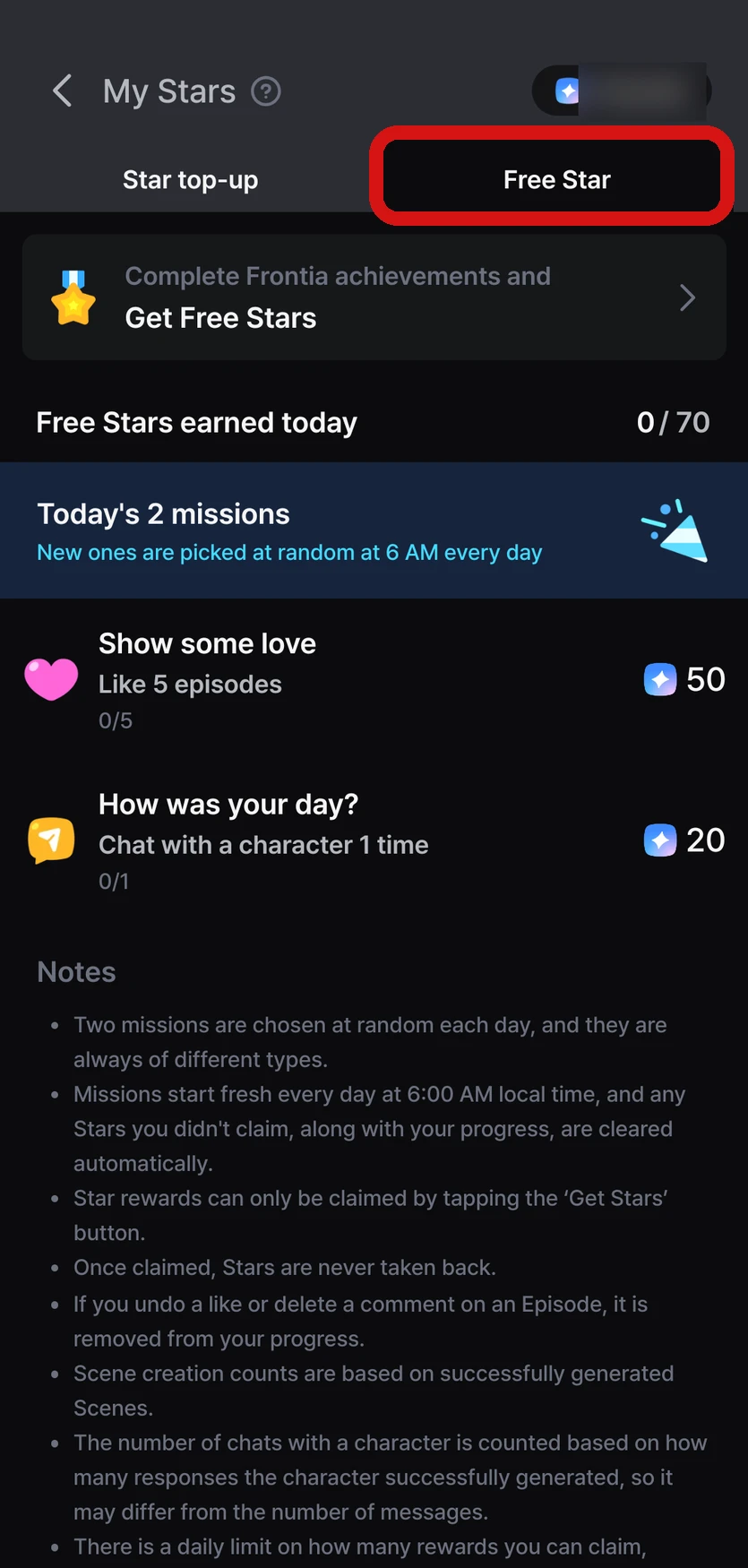
Complete missions every day in the 「Free Star」 tab on the Star top-up screen to get free Stars. You can also get them from achievements, inviting friends, Welcome Stars, the web sign-up gift, and writing a review. If you need more, you can top up.
Get Stars for free
1. Daily missions — 2 new missions every day
Tap the Star balance at the top right of the Home screen, then check today's missions in the 「Free Star」 tab.
- You get 2 missions of different types at random each day (like an Episode, leave a comment, generate a scene, chat with a character, and more). "Generate a scene" means the AI continues the story once while you're playing an Episode
- Rewards are 20–150 Stars per mission, for 40–250 Stars a day
- When you complete a mission, tap its 「Get Stars」 button to claim it (it isn't added automatically)
- Missions reset every day at 6 a.m. local time, and any unclaimed rewards and progress disappear at that time. Stars you've already claimed stay
- Rewards are claimed in the app
- There's a limit on how many times rewards can be claimed per account and device. If another account has already claimed that day's reward on the same device, you can't claim it
- If you've agreed to receive notifications, we'll send you a free Star reminder every day at 20:00 local time
2. Achievements
Step-by-step goals that build up as you use Frontia. You get free Stars each time you complete a step.
- Check them in MY → menu (≡) at the top right → 「Settings」 → 「My Achievements」, or from the 「My Achievements」 banner in the 「Free Star」 tab
- You need to tap each completed achievement card yourself to claim the reward (it isn't added automatically)
- Stars from achievements must be used within 30 days of receiving them
3. Invite friends — 1,000 Stars each for you and your friend
You can find your invite code in MY → menu (≡) at the top right → 「Settings」 → 「Invite friends」. Copy and send the code or share the invite link directly, and when your friend enters the code while signing up, you and your friend each get 1,000 Stars.
- There's no limit on how many people you can invite, and you can see the number of friends you've invited and the Stars you've received in Invite status
- Your friend can only enter the invite code while signing up in the app. It can't be entered after sign-up is finished → Where do I enter a friend's invite code?
- You can't use your own invite code
- The invite reward can only be received once per account and device
- Inviting friends is available in the Frontia app
4. Welcome Stars
The first time you open the app after signing up, you can get 1,000 Welcome Stars (once per device and account).
5. Web sign-up gift
When you finish signing up on the web (frontia.ai), we give you 200 Stars as a gift (once per account). It shows up in your Star history as a web sign-up gift.
6. Review reward — 1,000 Stars
When a review request pop-up appears during play, tap it, leave a review in the store, and come right back to the app to get 1,000 Stars.
- Once per account, and only in the Frontia app
- Reviews you leave directly in the store without going through the pop-up aren't eligible
Stars you get this way are free Stars, so they must be used within 30 days. For details, see What are Stars?.
We plan to add more ways to get free Stars. We'll share news in our announcements.
Top up
Tap the Star balance at the top right of the Home screen, or your Star balance in MY, to open the Star top-up screen. If you run low on Stars while playing, a pop-up appears so you can go straight to the top-up screen.
| Platform | Payment method |
|---|---|
| iOS | Apple in-app purchase |
| Android | Google Play in-app purchase |
If you paid but didn't get your Stars, see I paid but didn't get my Stars.
FAQ
Q. Is it okay to play with only free Stars?
Absolutely. Free Stars and paid Stars work exactly the same when you play — either way, you can enjoy the same Episodes in the same way. The only difference is that free Stars have a time limit (30 days).
Using the Wings (10 Stars per story step) or Spark (20 Stars) model lets you save Stars and play longer. The prologue and special scenes in the middle of a story can be viewed without Stars. For how many Stars each model uses, see When and how many Stars are used?.
Q. My mission count isn't going up.
Check each of these.
- Generate a scene missions don't count the prologue — only the times the story actually continued
- Chat with a character missions only count the times a character replied to a message you sent. Messages a character sends you first don't count
- Comment missions count comments you write (including replies), and they must be at least 2 characters long. Deleted comments don't count
- Like missions don't count when you unlike and like again an Episode you'd already liked
- If you met the conditions and it still doesn't go up, fully close and reopen the app. If it's still the same, let us know through Contact support
Q. I completed an achievement, but I didn't get Stars.
Achievement rewards aren't added automatically. Go to MY → menu (≡) at the top right → 「Settings」 → 「My Achievements」 and tap the completed achievement card to claim it. If you don't see the screen, please update the app to the latest version.
If you claimed a reward but don't see the Stars, see I didn't get reward Stars I should have received.